@media only screen and (max-width: 768px) }Mike G.Launch Monitor Tester
Carl's Team Insights: The Most Affordable Overhead Launch Monitor
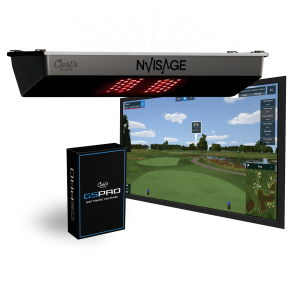
Many indoor golfers are looking for that clean look and feel you get with an overhead mounted launch monitor. Many of those same people don't have the budget for most overhead mounted units. That's where the NVISAGE N1 comes in.It's the most affordable overhead launch monitor out there.
With two high-speed cameras you get a lot of useful ball data. For the average golfer looking to improve, it gives you the data you'll find most valuable. Plus, I like playing GSPro courses. The N1 doesn't have its own software, but offers free third-party integration and is priced so low you'll have budget left to invest in the rest of your golf simulator setup.
Take the training into your own hands with instant visual feedback! Use Carl's Golf Swing Camera to replay and analyze each golf swing in slow motion to quickly and efficiently work toward your ideal game.NVISAGE N1 Features
Mounts Overhead
The NVISAGE N1 is positioned above and beyond the reach of stray shots, swinging clubs, or anyone's feet. With the help of Carl's specially designed NVISAGE frame mount, the device can be effortlessly attached directly onto any of Carl's Pro Enclosures.
Third-Party Integration
One of the standout features of the NVISAGE N1 is its compatibility with third-party golf analysis and simulation software. This means you have the freedom to choose and use your software of choice between GSPro and E6 Connect to dive into the data and insights that matter most to you, all without being tied to any proprietary launch monitor software.GSPro - Get one of the most realistic softwares on the planet. GSPro Golf Simulator Software leads the way with amazing 4K graphics, realistic ball flight and roll, and a community of users who are always "chipping in." Take some swings at the driving range, practice any shot on any downloadable course, compete in the skills test, or play matches locally and online on more than 300 courses. E6 Connect- Use E6 with launch monitors to teach or train on the driving range, to compete in leagues and online events at a commercial facility, or just play fun games at home with friends and family.
Real-Time Feedback With instant feedback, your practice and playing will be efficient. The NVISAGE N1's multi-camera setup enhances accuracy by capturing precise data on your swing from multiple angles, ensuring a more comprehensive analysis of your performance.
Ready ZoneA 24-inches-deep-by-20-inches-wide hitting area allows golfers a large area to tee up the ball, which helps not only with ease of use but mounting flexibility in tighter spaces.
How It Works
The pair of 2,000FPS cameras precisely track the rotation and trajectory of the ball, while the advanced PhysX 6D Physics Engine offers an immersive and lifelike pitching experience. NVISAGE N1 does the reading and analysis, but it does require a golf simulator software. It is compatible with GSPro and E6 Connect. The NVISAGE N1 requires marked balls with a specifically designed dot pattern to optimize the accuracy of the unit. See How The N1 Compares to the EYE XO2Data Parameters (using marked balls)Club Speed
Ball Speed
Launch Angle
Spin Axis
Horizontal Launch Angle
Back Spin
Side Spin
Total Spin
Get Started
Unboxing the N1What's Included
Launch Monitor Sensor
Calibration Board
Power Adapter and Cable
Ethernet Cable
Mounting ScrewsLevel12 High-Quality Marked BallsPC Requirements
Minimum requirements are determined by your course software. We recommend reviewing the recommended specs of the software you plan to use.
Intel i5 8400 (Not compatible with Apple iOS or Mac OS)8 GB RAMGeForce GTX 1060 (AMD: 3rd gen Ryzen or higher and AMD Ryzen 3600X or higher (AMD 2700 is not compatible)Windows 10 (64 bit) Version 1803 or higher
Ethernet Port Required
Ideal Space Requirements
Mount the NVISAGE N1 9-10 feet above your hitting surface, and 2 feet in front of the hitting area. Based on our recommendation of hitting from at least 10 feet from your impact screen, that places the NVISAGE N1 about 8 feet from the impact screen.