Free download

Free stream overlays

Drop one on your OBS scene and your stream looks broadcast grade in a minute.

  • 16 layouts
  • 8 colours
  • 1080p and 4K
  • No account, no email
What is in the pack

A pack of blank overlay frames for your everyday golf sim streams. A full scene frame is a 1920x1080 PNG with see-through windows for your game capture, your cameras and your chat, and empty plates where you add your own title, names, score and logo in OBS. The camera frames are cameras alone, cropped to the cameras, so you drop one on a scene you already have and scale it where you want it. No text on the frames apart from the VS mark on the 7 layouts that carry a VS shield, and no branding (every colour except TBG Blue, which carries one mark). No account, no email. Pick a layout, a format and a colour, see it on a mock stream, and download.

Colour Arena Navy
Card
1v1 camerasSide by sideArena Navy
Size
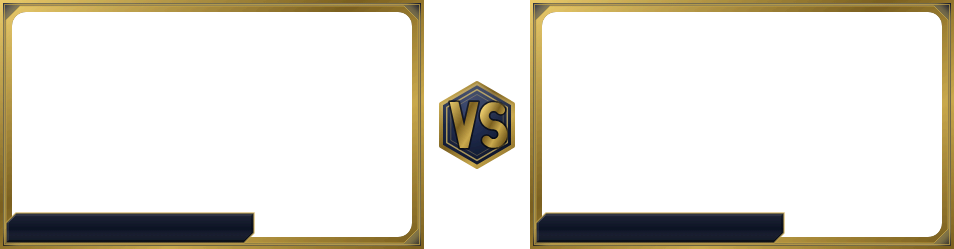
1v1 cameras overlay, Side by side, Arena Navy: a mock stream scene shows through the transparent windows

That is a mock stream under the frame. Your own sources go exactly there. Tap any plate on the frame to put your own text on it.

Or run it live
Shown on

https://www.mysimsetup.com/overlays/live/cam1v1-row-arena

Choose a layout

Layouts
Format

1v1 cameras. Two cameras with a VS between them.

Camera positions on their own, to drop on a scene you already have. 6 of 16 layouts, in 7 groups.

Put your own names on it

Tap any plate on the frame and type on it. Take a name from the crew and their photo comes with it, and switch any of it off again on the plate it sits on.

How the names work

The text lands where it will sit, at the size it will be. Start typing a name and matching Clubhouse members appear under it, or press the crew button beside the checkmark to look through everybody. Take one with Down and Enter or a tap and a small photo of them sits beside their name with their handicap after it, and their launch monitor is there to switch on. Type anything else and it stays exactly what you typed. Enter moves to the next plate, Escape puts one back.

If one of your players has no webcam, tick "No webcam, use their photo" on their plate and their picture fills that camera window instead of leaving a hole. It is per player, so everyone else's camera stays see-through.

Every plate on this frame holds one name and stays one line. The layouts with a title plate or a match info strip take more than one line on those two.

This frame has no logo square. Nothing on it is a slot for a picture, so a logo of your own goes on in OBS as its own image source, wherever you want it. The layouts with a logo square take one here.

What comes off, and what cannot. Everything this panel draws is yours to switch off on the plate it sits on: a title, the match info, any name, the photo beside it, the handicap, the monitor pill and your logo. Switching one off keeps what you typed and takes it off the preview, off the PNG and off the live address at once. The frame under all of it is a finished PNG, so the plates themselves, the see-through windows, the VS shield and the borders are pixels in the file and no switch here can take one away: pick another layout or another colour for a different set of them.

A plate that holds a crew member can also show their MSS handicap and their launch monitor. The handicap follows the name on the same line, in the colour the rest of the site gives that number: red for a plus golfer, blue over scratch, amber where an admin set it by hand. The launch monitor is a small pill at the right end of the plate, in that colourway's own accent. Two more ticks on that plate, only offered for a member who has the value: the handicap comes on the moment you take a member and one tap takes it off, and the launch monitor waits until you ask for it. Every frame in the pack takes both, 4:3 included. The name is always served first, so a long one loses its tail before either of them does.

The live address takes the same text on the end: title=, info=, n1= to n4= for the camera names in order, t1= and t2= for the team plates, 40 characters each, then a1= to a4= for the photos, c1= to c4= for the cameras filled with one, h1= to h4= for the handicaps, o1= to o4= where an admin set that handicap by hand, and m1= to m4= for the launch monitors. The PNG is named cam1v1-row-arena-custom.png. Nothing is uploaded or saved: the PNG is drawn in your browser.

Download every colour1080p zip, all 1v1 cameras frames, 0.3 MB, with a placement readme

Set it up in OBS

  1. Add the PNG as an Image Source at the top of your scene, then drag and scale it where you want the cameras. It is cropped to the cameras, so it is not canvas size and is not meant to be.
  2. Place a camera behind each window, at the positions in the list. Scale each camera to 16:9 to fill its window. Your game and your chat stay where they already are, on the layers under it.
  3. Add a Text source over each blank plate: a name plate per camera (the VS shield is already lettered).
  4. Or skip the PNG: add the live address as a Browser Source instead of an Image and the same frame runs with its motion, carrying whatever you typed. It is under the frame, on the Copy live address button.
  5. Run your events on the site and the live match overlays fill these same windows with the score, the hole, Pick'em and the win probability, updating as you play.
Size and motion options

Size it 954 x 249, or 1908 x 498 at twice the size; it scales itself and stays sharp. The motion is a slow sheen over the plates, breathing halos on the cameras, a turning ring on the VS and a light drifting across the frame. Add ?motion=off to the address for the still frame (the PNG exactly), or ?motion=calm for half-strength motion.

Placement list for this frame (2 windows, 3 plates, exact pixels)

In 954x249 frame pixels: x, y, then width x height. 2 cameras, all 16:9.

Window (your source)xysize
Camera 11212400 x 225 (16:9)
Camera 254212400 x 225 (16:9)

Blank plates (put a Text or Image source over each):

Platexysize
VS shield (already lettered)4338188 x 88
Name plate (Camera 1)6213248 x 30
Name plate (Camera 2)536213248 x 30

Free for your own streams and videos. Every colour except TBG Blue carries no text beyond the VS mark on the 7 layouts that carry a VS shield, and no branding, so the frames are yours to put your name on. Want something the pack does not cover? Tell us.