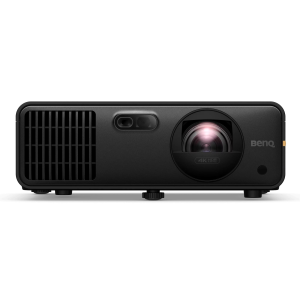
Transform your golf simulator and/or home theater with the BenQ AK700ST 4K projector. Setup is easier with Auto Screen Fit, vibrant 4,000-lumen brightness, and lifelike Golf Mode for an immersive experience. The short-throw lens eliminates shadows and keeps your swings smooth, while durable laser technology ensures years of stunning visuals without the upkeep.BenQ AK700ST FeaturesFlexible SetupWith its short-throw lens, the AK700ST can be positioned safely behind the player, reducing shadow interference and minimizing the risk of damage. Supports screen sizes up to 200 inches with a 1.2x optical zoom for flexible placement.Plus, warping capabilities make it easy to project onto a curved screen like Carl's Curved Golf Enclosure.Immersive, Long-Lasting BrightnessWith 4,000 lumens, the projector delivers bright and clear images, even in well-lit rooms.The laser light source offers up to 20,000 hours of operation, reducing maintenance and replacement costs.Keep FocusedAdjust focus easily using the remote control without needing to access the projector directly.Garage ReadyThe IP5X-rated sealed engine operates reliably in various environments, reducing maintenance needs.How It WorksBenQ's AutoFit feature is super handy - it can tweak the image size, focus, and alignment to match your screen. However, you still need to place your projector so the image roughly fills your screen before you hit that AutoFit button.1. Placing the ProjectorMount or position your projector so the image is bigger than your screen on all sides. Yep, make it overflow a little, BenQ recommends a screen border of at least 2.4 around your screen. Now our C-Series screens don't quite play by those border rules - the image goes all the way to the floor. Luckily, AutoFit still plays nice. We checked.2. Firing It UpWhen you turn on your projector for the first time (or after a factory reset), you'll get a pop-up to start AutoFit. Press OK.3. Tweaking the PositionYou'll see a pattern on your screen. This is your cue to adjust the projector's distance, tilt, and zoom so the pattern fits nicely inside the borders of your screen.4. Let AutoFit Do Its ThingOnce that pattern is sitting inside your screen, press OK again. The projector will then automatically adjust the image to fit your screen's size and aspect ratio.5. Fine-tune with Corner FitAutoFit gets you close, but not always perfect. After it runs, you'll get a screen to adjust the corners just right.See How We Did ItWatch us set up the AK700ST. The manual is also available in the Resources section below.Ordering InformationShipping LimitationBenQ products ship to US addresses only.
✓ 8.4 ms lag (1080p 240Hz) for instant shot feedback
✓ 20,000-hr laser — zero lamp swaps for the life of the sim
✓ 0.69–0.83:1 short throw fits tight golf-sim bays
⚠️ Trade-offs
• No optical lens shift — placement must be exact
• 4K 60Hz lag is 33.4 ms — low lag needs 1080p modes
• Premium $2,899 price vs gaming-projector rivals
• Auto Screen Fit is digital — corner-fit trims sharpness
📋 The fine print
No lens shift: the powered 1.2x zoom helps, but the mount must match the fixed 102.5% offset; Auto Screen Fit is digital keystone and trims resolution. Best lag (8.4 ms) requires 1080p 240Hz.
📋 Specifications
Value
Best For
Golf simulator enthusiasts and home theater users wanting automated setup with professional image…
Key Tradeoffs
Premium pricing but offers specialized golf optimization and hassle-free Auto Screen Fit that competitors…
Resolution
4K UHD
Lumens
4000
Contrast Ratio
3000000:1
Throw
Short-Throw
Throw Ratio
0.69-0.83:1
Light Source
Laser
Lamp Life
20000
Connectivity
(x2) HDMI-1 (2.0b/HDCP2.2), HDMI-2 (2.0b/HDCP2.2)
Weight
7.5 lbs
Mounting
Ceiling mount, drop mount, enclosure mount, or floor placement with protection