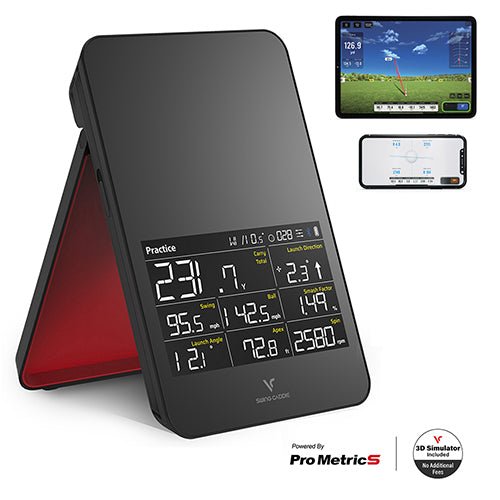
Voice Caddie SC4 Pro
Portable
$499One retailer
Some links on this page earn this site a commission at no extra cost to you. Learn more.
Where to buy
No retailer offers are tracked for this unit right now. It may be discontinued, trade-in only, or between stock cycles. Prices refresh automatically the moment a tracked retailer lists it again.
Sold direct by My Sim SetupSee the shop
We sell these ourselves, in the same category as this one.

Verified research
From the MSS study: what the sensor measures, what it costs to run, and what it needs from the room.
RadarClub data: Speed onlySpin: Measured
Budget portable radar with free app and E6 integration for home sim without special balls.
$499Hardware, best price
NoneRequired subscription
$499Five-year cost
VoiceCaddie S App (Free): free, required. E6 Connect (5 courses free): free. E6 Additional Courses: price varies.
Why people buy
Budget radar at ~$500 with any standard ball
Portable, works indoors and outdoors
Free app covers all core metrics and 3D range
E6 Connect with 5 free courses included
Trade-offs
Spin is algorithm-derived; several hundred RPM variance
Club data limited to swing speed only
Needs ~12 ft ball flight space
E6 extra courses require paid subscription
Ball tracking
Ball SpeedMeasured
Launch AngleMeasured
Launch DirectionMeasured
Spin RateMeasured
Spin AxisMeasured
Club tracking
Club SpeedCalculated
Club PathNot possible
Face AngleNot possible
Attack AngleNot possible
From the verified MSS launch-monitor study: measured = read directly by the sensor; calculated = algorithm-derived.
PlacementBehind, about 18 ft of room depth
EnvironmentBoth, indoor and outdoor
BallAny standard USGA/R&A golf ball; no special balls required
Third-party simsSupported, E6 Connect (iOS/PC, 5 courses + 1 range free), OptiShot Orion, VoiceCaddie S app. No GSPro/TGC/FSX support.
The fine print
Spin is radar/algorithm-derived, not optically measured; accuracy typically several hundred RPM variable. No club path/face angle despite some marketing claims. VoiceCaddie S app is free with all core metrics and 3D range. E6 Connect optional: 5 courses free, additional courses require subscription (price not published).Specifications
Core Technology
Core Tech TypeRadar
Sensor Technologyno cameras, 1 radar
Technology DetailPortable Doppler radar launch monitor. Sensor is a K-Band 24 GHz Doppler radar that tracks the ball's flight after impact.
Performance Data
Ball Data
Club DataCalculated only, one club-side metric. The unit reports "Swing Speed" (club head speed), which is radar-derived.
Compatibility
Sim Readiness and Software Included
Device / PC Reqs
Subscription CostNo subscription required for core use, the VoiceCaddie S app (data storage, spin/ProMetrics metrics, 3D range) is free on iOS/Android.
Special Balls/Markers
Physical
Width (in)4.88
Height (in)7.59
Depth (in)1.14
Typical PlacementBehind golfer
Indoor / OutdoorIndoor + outdoor
PortableYes
Mounting
DisplayOnboard touchscreen
Value
GradeConsumer
Best ForBudget home sim & outdoor range practice